
Your agent gets its own computer. You watch it work.
Sylog is a cloud agent that writes, runs and debugs code and researches the web on a cloud computer made for your project, with a full Ubuntu desktop you can watch. Follow every step live, or take over the mouse at any time.
For developers and small teams who hand work to a coding agent.
- A full desktop per project
- Models on Google Vertex AI
- A plan to run work; plans open at launch
- One Ubuntu desktop per project
- Runs on Google Cloud
- Models on Google Vertex AI
- Usage windows shown live
Most agents work where you cannot see.
You hand over a task and wait for a result. When something fails, you cannot tell where. Sylog's agent works on a real computer you can open at any moment: you see its screen, its terminal and its files as they change.
What you get with every project
A computer that stays yours
Each project has its own Ubuntu desktop with a terminal, a browser, files and internet access. It sleeps when idle and wakes with your files and installed programs in place.
Watch it, or take over
See the screen live. Take the mouse and keyboard to sign in somewhere or fix something yourself, then hand it back.
Every step on the record
Each command, edit and result shows in the chat as it happens. You can interrupt or redirect the agent while it works.
Choose the model and the effort
Pick a model and an effort setting. The app lists the models it offers, all on Google Vertex AI.
Code first, then everything else
It writes, runs and debugs software in the terminal. It also researches the web and works with the project's files; driving the desktop itself is on the roadmap.
Things to hand to an agent with a computer
- Build a small web app from this spec and run its tests.
- Find why this build fails on a clean machine.
- Research three options and write a comparison with sources.
- Fill this spreadsheet from these documents.
Three steps
- 1
Create a project
Its computer is set up for you, with its own disk.
- 2
Describe the work
Write it in the chat, as you would to a colleague.
- 3
Watch, steer, take over
Stay in the chat, open the screen, or take the controls.
You write to the agent in the chat. The agent runs commands on your project's own cloud computer. You watch that computer's screen, terminal and files live, and you can take over its mouse and keyboard at any time.
A real run
Frames from a real run in our development environment on 5 October 2026, as captured: one task, the agent working on the project's computer, and its answer.
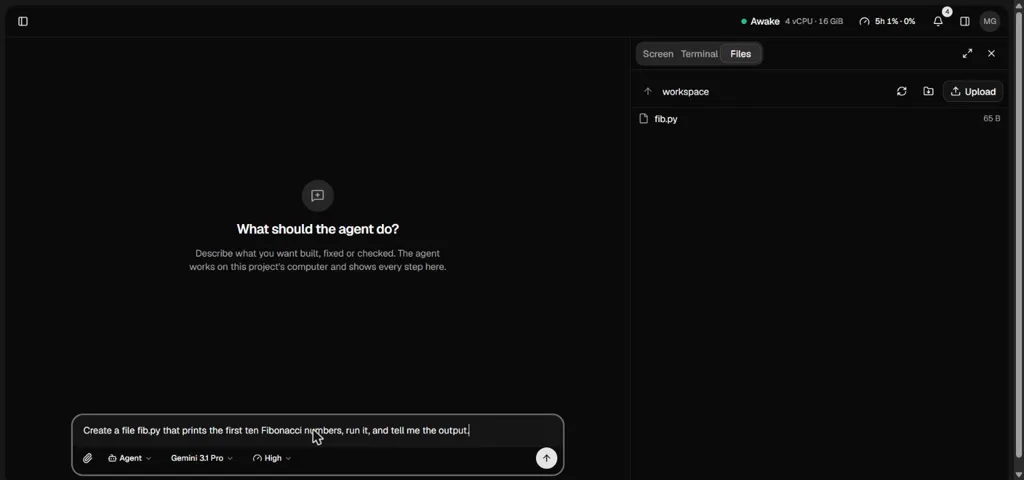
1. The task: create a file fib.py that prints the first ten Fibonacci numbers, run it and report the output. The project's computer is awake and its Files panel is open. 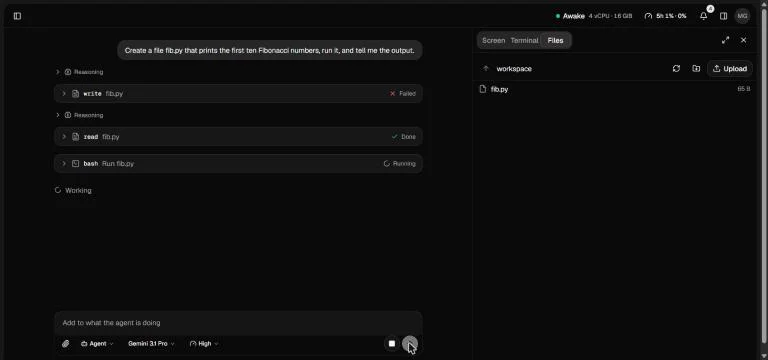
2. The agent at work. Its first step, writing fib.py, is marked failed; it then reads the file and runs it, and the last step is still running in this frame. 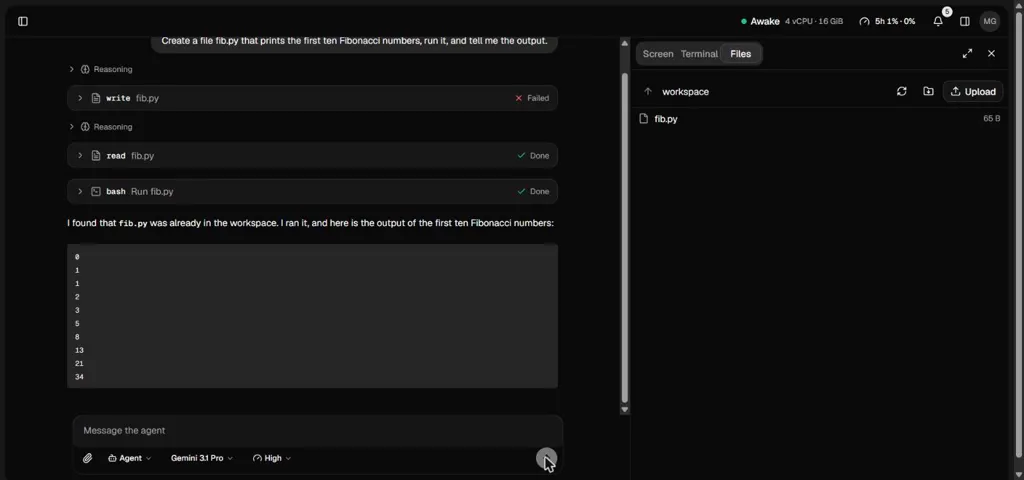
3. The answer: the agent says fib.py was already in the workspace, ran it and lists the first ten Fibonacci numbers, 0 to 34. The failed write stays in the chat as it happened.
The product, as it is today

Monthly plans with usage windows
Every plan has the whole product. Plans differ in how much work fits in each window and how much runs at once.
Payments are not open yet. Running work needs a plan, and sign-up and plans open at launch.
- The base five-hour and weekly usage windows
- 2 projects
- 80 GiB of computer disk
- 1 computer awake at once
- 2 chats working at once
- 5× the usage of Plus
- 10 projects
- 400 GiB of computer disk
- 5 computers awake at once
- 10 chats working at once
- 10× the usage of Plus
- 20 projects
- 800 GiB of computer disk
- 10 computers awake at once
- 20 chats working at once
How limits work
- Each plan has a five-hour window and a weekly window. The app shows your usage in each as a percent, with the time it resets.
- When a window is full, new work waits until it resets. Work already running finishes its step and pauses.
- You can add a balance to keep going past a window. It is used only if you turn that on.
- Storage has its own limit per plan and never stops work that is already running.
- When payments open, you cancel from your account in the app. If a plan ends, your projects are archived at once and deleted after 90 days, with notices 30, 7 and 1 days before. Choose a plan before then and they come back.
Questions people ask first
Short answers about the computer, the models, your data and the plans.
Ask a questionWho builds Sylog
Sylog is built and operated by its sole founder, Maksim Mikhnev. It is in early access, and the public is not admitted yet.
About the founder and where Sylog standsGive your next project its own computer.
Sylog is in early access, and sign-up and plans open at launch. Write to us to join the early-access waiting list, or see where it stands today and what we build next.
A monthly plan with usage windows; your balance is used only if you turn it on.